Live Preflight
A panel for Adobe Illustrator · Last updated November 2026
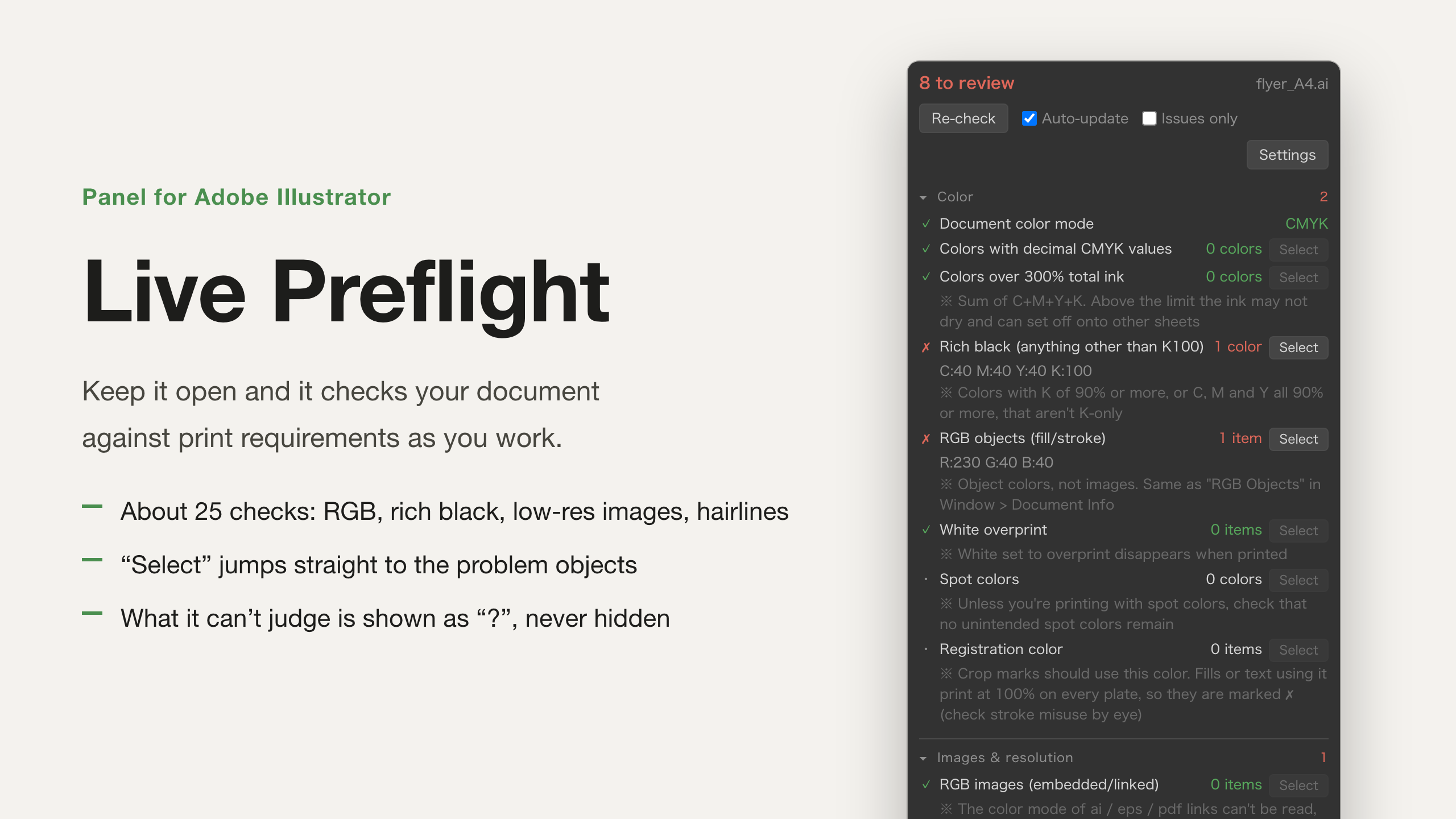
Live Preflight is a panel that stays open in Illustrator and keeps checking the document you are working on against print requirements. It checks again when you edit, so you see problems while you work, not just before you send the file.
Items with problems show ✗, a count, and the names of the matching objects. Press “Select” and those objects are selected on the canvas.
The trial and the full version are the same file. Enter a license key after you buy and it becomes the full version. One-time purchase, no subscription. As a rule, purchases are not refunded because there is a free trial; see the license agreement for the exception when a defect makes it unusable.
What it checks
| Color | Document color mode, CMYK values with decimals, total ink over the limit, black that is not K100 (rich black), RGB objects, white set to overprint, spot colors, misuse of Registration color |
|---|---|
| Images | RGB images, missing links, images below the minimum resolution (effective resolution at placed size), linked files that are not PSD / EPS / TIFF, full-width characters in file names, raster effect resolution |
| Strokes, text | Strokes below the minimum width, text that is not outlined, fonts in use, stray points, objects with no fill and no stroke, empty text paths, objects outside every artboard |
| State | Locked, hidden, and non-printing layers; locked and hidden objects |
Settings
You can change the thresholds in Settings. The defaults are:
- Minimum image resolution: 300 dpi (350 dpi when the panel is in Japanese)
- Minimum stroke width: 0.3 pt
- Total ink limit: 300 %
- Raster effect resolution: 300 ppi
The panel shows English or Japanese. By default it follows Illustrator’s language. You can also choose the language in Settings.
What it cannot judge
Illustrator scripts cannot read the contents of symbols, envelopes (warps), blends, graphs, meshes, and patterns, or the color mode and resolution of linked AI / EPS / PDF files. These are not marked ✓. They are shown with “?” and counted as items to check by eye.
It also does not judge fills, strokes, and effects added in the Appearance panel, crop mark size, bleed width, or font and image licenses.
Free trial
You can use every feature for 14 days. Only the days you actually use the check are counted: days you press “Re-check”, and days the panel checks again after you edit. Days you only install it are not counted.
After 14 days, verdicts (✓ ✗ ?) and counts are still shown. Three things stop: “Select”, the names of the matching items, and Auto-update.
Requirements
- macOS
- Tested with Adobe Illustrator 2026
Install
Drag 入稿チェック.zxp from the downloaded folder onto the free app “ZXP Installer”. (入稿チェック is the panel’s Japanese name; the file is the same for both languages.) Step-by-step instructions are in “Read Me First.txt” in the folder.
License key
Your license key is shown in your Gumroad purchase email and in your Gumroad library. In the panel, press “Enter license key”, paste the key, and press “Activate”. You need an internet connection when you activate.
Please note
This panel is an aid for checking. It cannot guarantee that it finds every problem. Make the final decision by eye and with proofs. The default thresholds follow common print requirements. If your printer’s requirements are different, follow your printer’s specifications and change the values in Settings.
License agreement · Privacy policy · 特定商取引法に基づく表記 (Japanese legal notice)